


1. Spring AI API
1.1. AI 模型 API
跨 AI 提供商的便携式 模型 API,用于 聊天、文本到图像、音频转录、文本到语音 和 嵌入 模型。支持 同步 和 流式 API 选项。也支持访问模型特定功能。
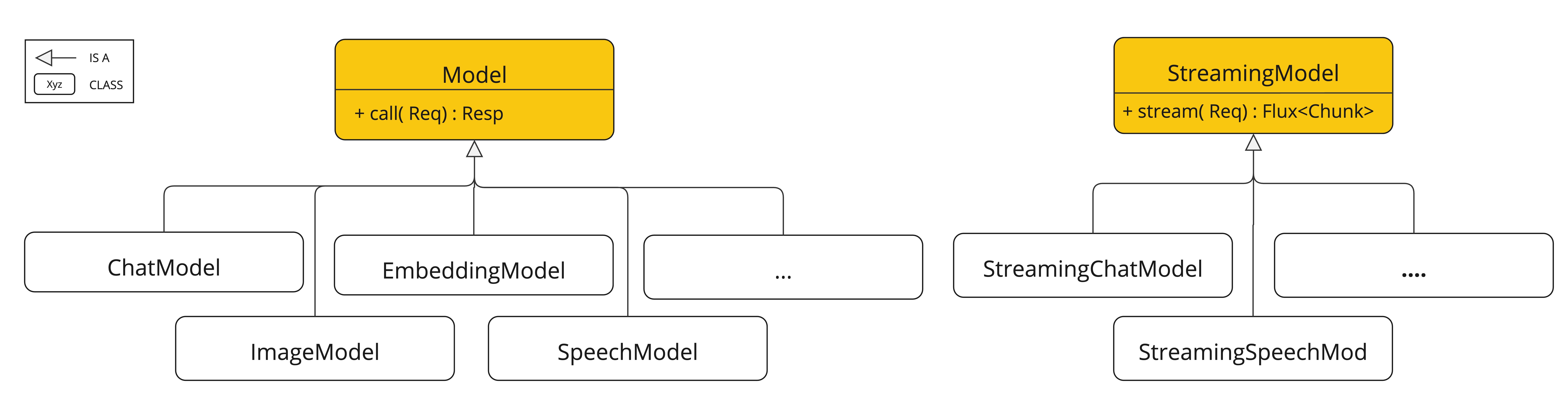
支持来自 OpenAI、Microsoft、Amazon、Google、Amazon Bedrock、Hugging Face 等的 AI 模型。
1.2. 向量存储 API
跨多个提供商的便携式 向量存储 API,包括新颖的 类 SQL 元数据过滤器 API,它也是可移植的。支持 14 种向量数据库。
1.3. 工具调用 API
Spring AI 使 AI 模型可以轻松调用您的服务,作为使用 @Tool 注解的方法或 POJO java.util.Function 对象。

1.4. 自动配置
Spring Boot 自动配置和用于 AI 模型和向量存储的启动器。
1.5. ETL 数据工程
用于数据工程的 ETL 框架。这为将数据加载到向量数据库提供了基础,有助于实现检索增强生成模式,使您能够将数据带入 AI 模型以纳入其响应。

2. 聊天模型API
聊天模型API为开发者提供了将AI驱动的聊天补全能力集成到其应用程序中的能力。它利用预训练语言模型(如GPT)生成类人化的自然语言响应。
该API通常通过向AI模型发送提示或部分对话来工作,然后模型根据其训练数据和对自然语言模式的理解生成对话的补全或延续。完成的响应随后返回给应用程序,应用程序可以将其呈现给用户或用于进一步处理。
Spring AI Chat Model API旨在成为一个简单且可移植的接口,用于与各种AI模型交互,允许开发者以最少的代码更改在不同模型之间切换。这种设计符合Spring的模块化和可互换性理念。
此外,借助Prompt用于输入封装和ChatResponse用于输出处理等配套类,聊天模型API统一了与AI模型的通信。它管理请求准备和响应解析的复杂性,提供了直接且简化的API交互。
2.1. API 概述
本节提供了Spring AI聊天模型API接口及相关类的指南。
2.1.1. ChatModel
以下是ChatModel接口定义
public interface ChatModel extends Model<Prompt, ChatResponse>, StreamingChatModel {

	default String call(String message) {...}

    @Override
	ChatResponse call(Prompt prompt);
}带有String参数的call()方法简化了初始使用,避免了更复杂的Prompt和ChatResponse类的复杂性。在实际应用中,更常见的是使用接受Prompt实例并返回ChatResponse的call()方法。
2.1.2. StreamingChatModel
以下是StreamingChatModel接口定义
public interface StreamingChatModel extends StreamingModel<Prompt, ChatResponse> {

    default Flux<String> stream(String message) {...}

    @Override
	Flux<ChatResponse> stream(Prompt prompt);
}stream()方法接受一个String或Prompt参数,类似于ChatModel,但它使用响应式Flux API流式传输响应。
2.1.3. Prompt
Prompt是一个ModelRequest,它封装了一个Message对象列表和可选的模型请求选项。以下列表显示了Prompt类的截断版本,不包括构造函数和其他实用方法
public class Prompt implements ModelRequest<List<Message>> {

    private final List<Message> messages;

    private ChatOptions modelOptions;

	@Override
	public ChatOptions getOptions() {...}

	@Override
	public List<Message> getInstructions() {...}

    // constructors and utility methods omitted
}
2.1.3.1. Message
Message接口封装了Prompt的文本内容、元数据属性集合以及称为MessageType的分类。
该接口定义如下
public interface Content {

	String getText();

	Map<String, Object> getMetadata();
}

public interface Message extends Content {

	MessageType getMessageType();
}多模态消息类型也实现了MediaContent接口,提供了Media内容对象的列表。
public interface MediaContent extends Content {

	Collection<Media> getMedia();

}Message接口有多种实现,对应于AI模型可以处理的消息类别
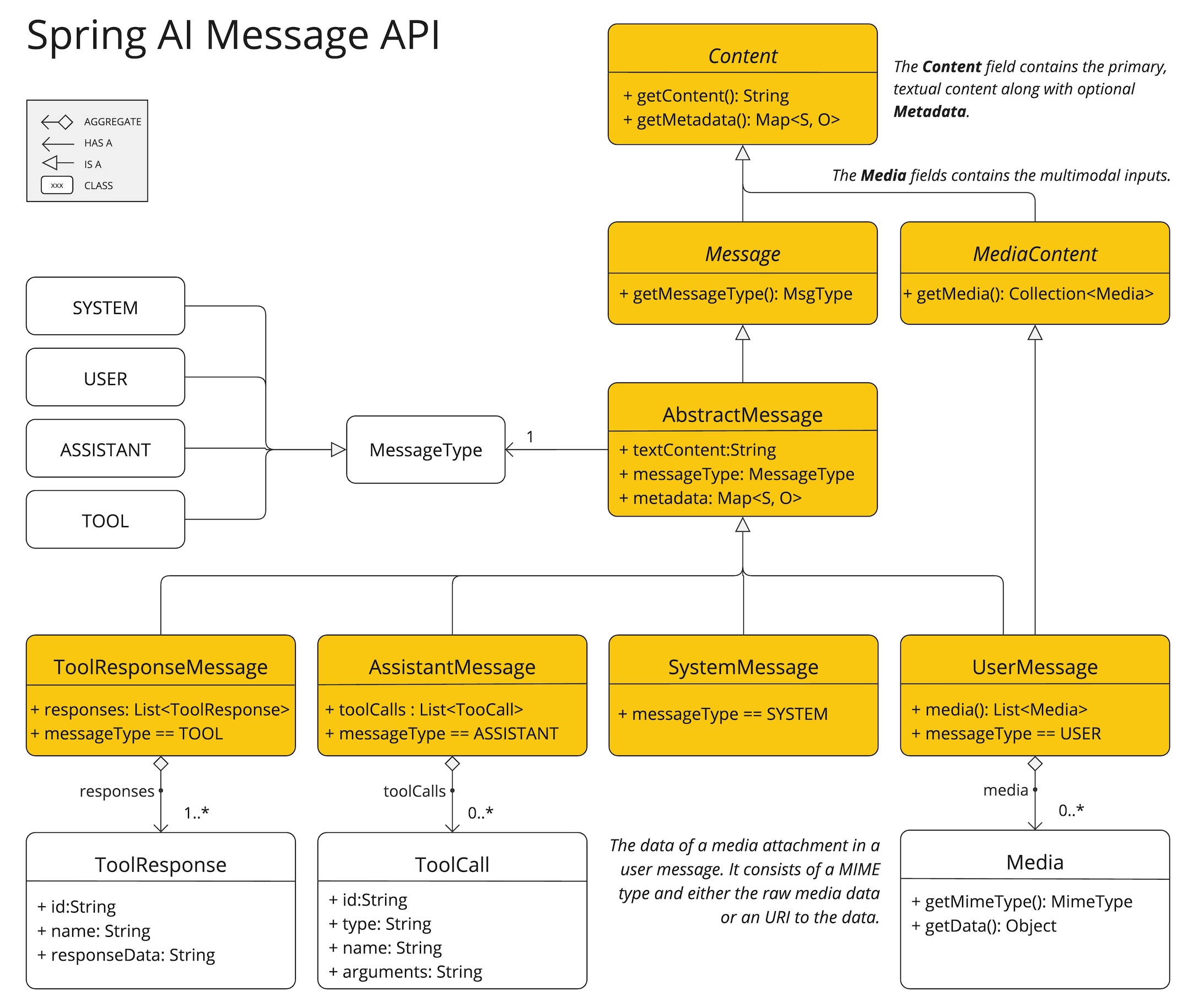
聊天补全端点根据对话角色区分消息类别,通过MessageType有效地映射。
例如,OpenAI识别针对不同对话角色的消息类别,例如system、user、function或assistant。
虽然术语MessageType可能暗示特定的消息格式,但在这种情况下,它有效地指定了消息在对话中扮演的角色。
对于不使用特定角色的AI模型,UserMessage实现作为标准类别,通常表示用户生成的查询或指令。
2.1.3.2. 聊天选项
表示可以传递给AI模型的选项。ChatOptions类是ModelOptions的子类,用于定义可以传递给AI模型的少数可移植选项。ChatOptions类定义如下
public interface ChatOptions extends ModelOptions {

	String getModel();
	Float getFrequencyPenalty();
	Integer getMaxTokens();
	Float getPresencePenalty();
	List<String> getStopSequences();
	Float getTemperature();
	Integer getTopK();
	Float getTopP();
	ChatOptions copy();

}此外,每个特定于模型的ChatModel/StreamingChatModel实现都可以有自己的选项,这些选项可以传递给AI模型。例如,OpenAI聊天补全模型有自己的选项,如logitBias、seed和user。
这是一个强大的功能,允许开发者在启动应用程序时使用模型特定的选项,然后使用Prompt请求在运行时覆盖它们。
Spring AI提供了一个复杂的系统来配置和使用聊天模型。它允许在启动时设置默认配置,同时还提供了在每次请求的基础上覆盖这些设置的灵活性。这种方法使开发者能够轻松地使用不同的AI模型并根据需要调整参数,所有这些都在Spring AI框架提供的一致接口中进行。
以下流程图说明了Spring AI如何处理聊天模型的配置和执行,结合了启动和运行时选项
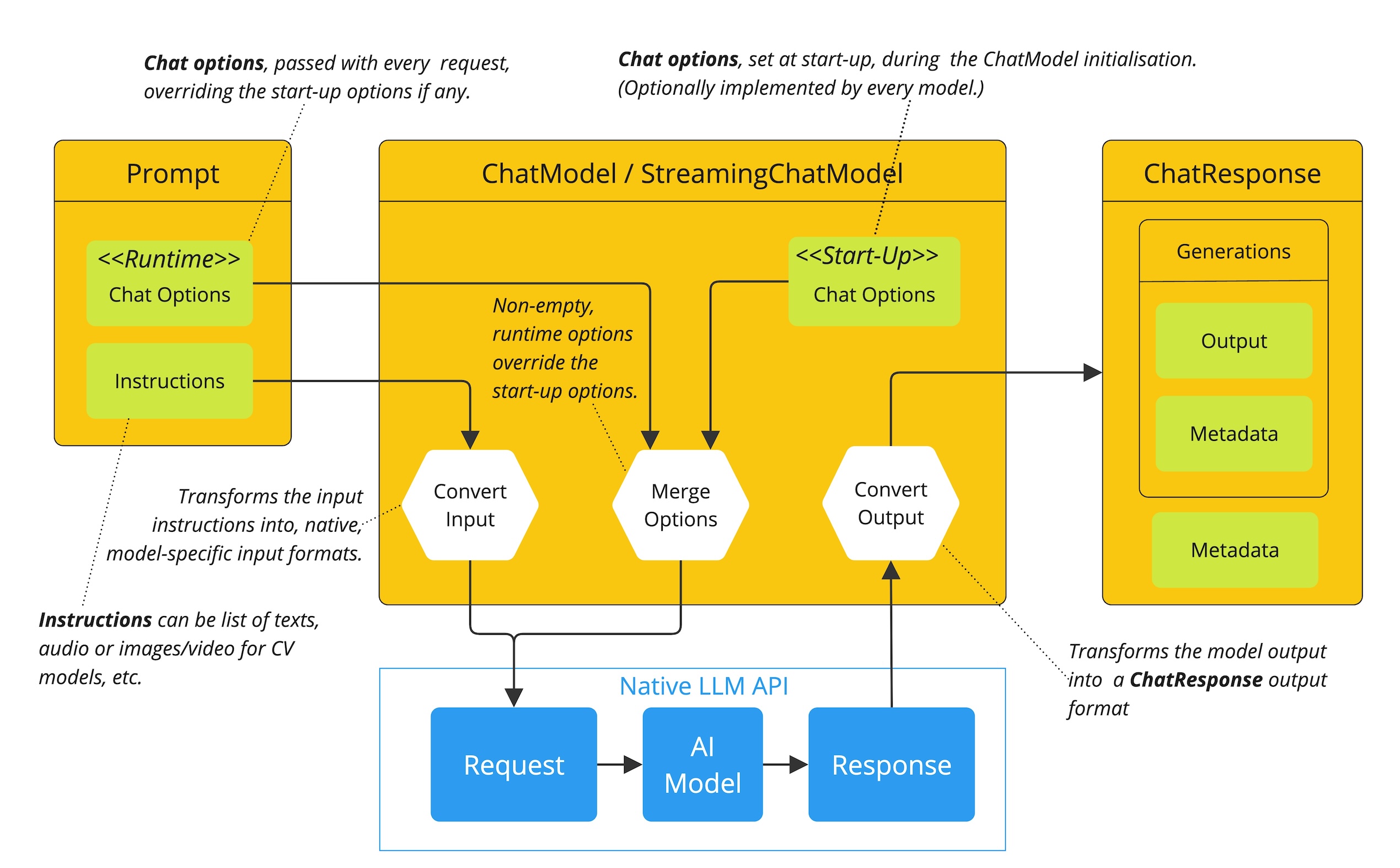
启动配置 - ChatModel/StreamingChatModel使用“启动”聊天选项进行初始化。这些选项在ChatModel初始化期间设置,旨在提供默认配置。
运行时配置 - 对于每个请求,Prompt可以包含运行时聊天选项:这些可以覆盖启动选项。
选项合并过程 - “合并选项”步骤结合了启动和运行时选项。如果提供了运行时选项,它们将优先于启动选项。
输入处理 - “转换输入”步骤将输入指令转换为本机、模型特定的格式。
输出处理 - “转换输出”步骤将模型的响应转换为标准化的
ChatResponse格式。
启动选项和运行时选项的分离允许全局配置和请求特定调整。
2.1.4. ChatResponse
ChatResponse类的结构如下
public class ChatResponse implements ModelResponse<Generation> {

    private final ChatResponseMetadata chatResponseMetadata;
	private final List<Generation> generations;

	@Override
	public ChatResponseMetadata getMetadata() {...}

    @Override
	public List<Generation> getResults() {...}

    // other methods omitted
}ChatResponse类保存AI模型的输出,每个Generation实例包含单个提示可能产生的多个输出之一。
ChatResponse类还带有关于AI模型响应的ChatResponseMetadata元数据。
2.1.5. Generation
最后,Generation类继承自ModelResult,表示模型输出(助手消息)和相关元数据
public class Generation implements ModelResult<AssistantMessage> {

	private final AssistantMessage assistantMessage;
	private ChatGenerationMetadata chatGenerationMetadata;

	@Override
	public AssistantMessage getOutput() {...}

	@Override
	public ChatGenerationMetadata getMetadata() {...}

    // other methods omitted
}
2.2. 可用实现
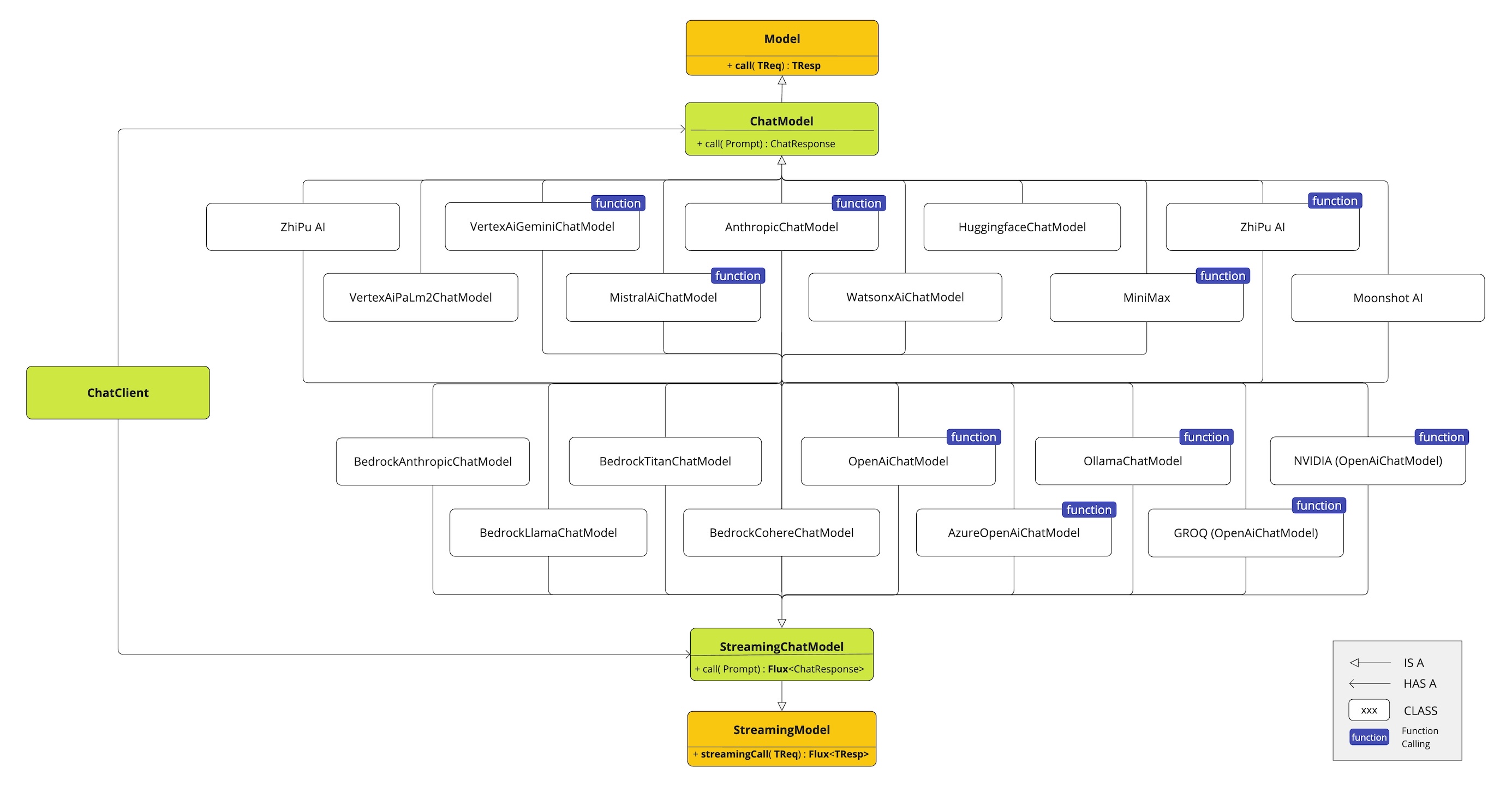
此图说明了统一接口ChatModel和StreamingChatModel如何用于与不同提供商的各种AI聊天模型进行交互,从而允许轻松集成和在不同AI服务之间切换,同时为客户端应用程序保持一致的API。
OpenAI聊天补全(流式传输、多模态和函数调用支持)
Microsoft Azure Open AI聊天补全(流式传输和函数调用支持)
Ollama聊天补全(流式传输、多模态和函数调用支持)
Hugging Face聊天补全(不支持流式传输)
Google Vertex AI Gemini聊天补全(流式传输、多模态和函数调用支持)
Mistral AI聊天补全(流式传输和函数调用支持)
Anthropic聊天补全(流式传输和函数调用支持)
2.3. 聊天模型API
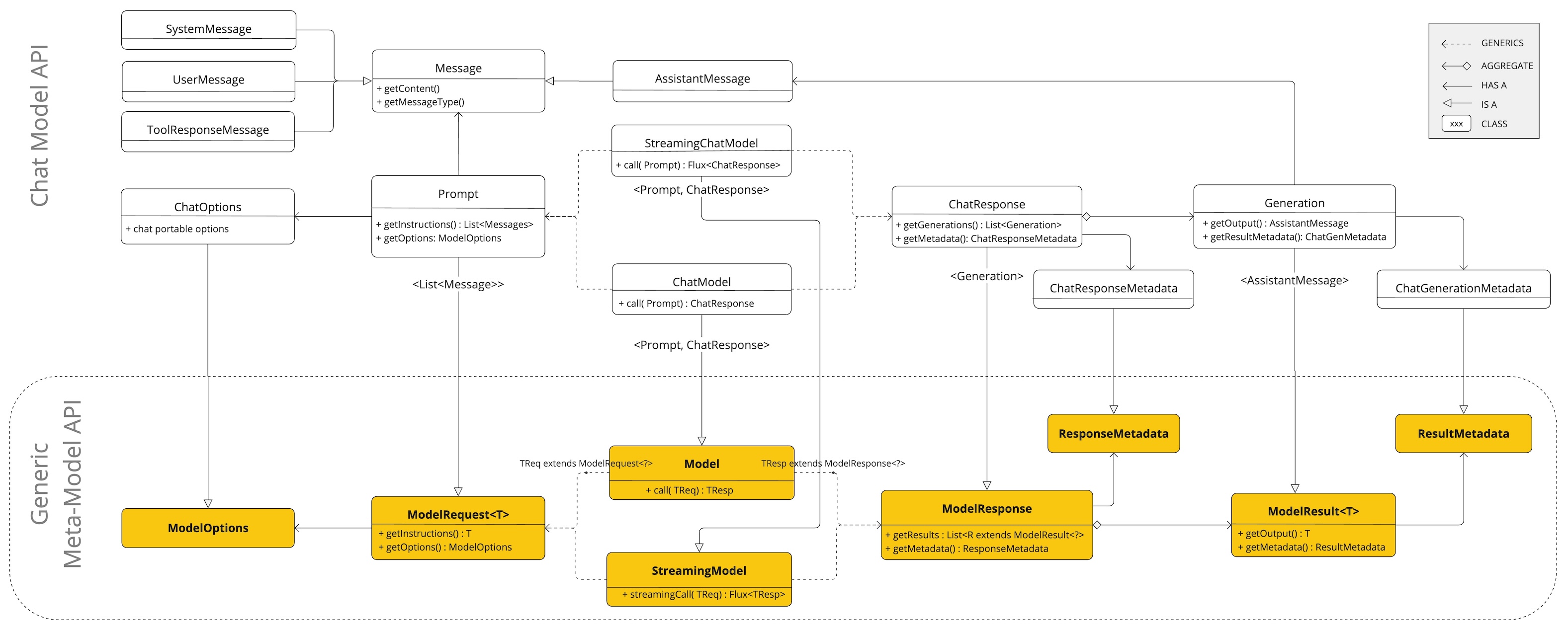
Spring AI聊天模型API构建在Spring AI 通用模型API之上,提供特定于聊天的抽象和实现。这允许轻松集成和在不同AI服务之间切换,同时为客户端应用程序保持一致的API。以下类图说明了Spring AI聊天模型API的主要类和接口。
3. 嵌入模型 API
嵌入是文本、图像或视频的数值表示,用于捕获输入之间的关系。
嵌入通过将文本、图像和视频转换为浮点数数组(称为向量)来工作。这些向量旨在捕获文本、图像和视频的含义。嵌入数组的长度称为向量的维度。
通过计算两段文本的向量表示之间的数值距离,应用程序可以确定用于生成嵌入向量的对象之间的相似性。
EmbeddingModel 接口旨在与 AI 和机器学习中的嵌入模型进行直接集成。其主要功能是将文本转换为数值向量,通常称为嵌入。这些嵌入对于语义分析和文本分类等各种任务至关重要。
EmbeddingModel 接口的设计围绕两个主要目标
可移植性:此接口确保可以轻松适应各种嵌入模型。它允许开发人员在不同的嵌入技术或模型之间切换,只需最少的代码更改。此设计与 Spring 的模块化和互换性理念相符。
简单性:EmbeddingModel 简化了将文本转换为嵌入的过程。通过提供
embed(String text)和embed(Document document)等直接方法,它消除了处理原始文本数据和嵌入算法的复杂性。这种设计选择使开发人员(尤其是 AI 新手)更容易在应用程序中使用嵌入,而无需深入了解底层机制。
3.1. API 概述
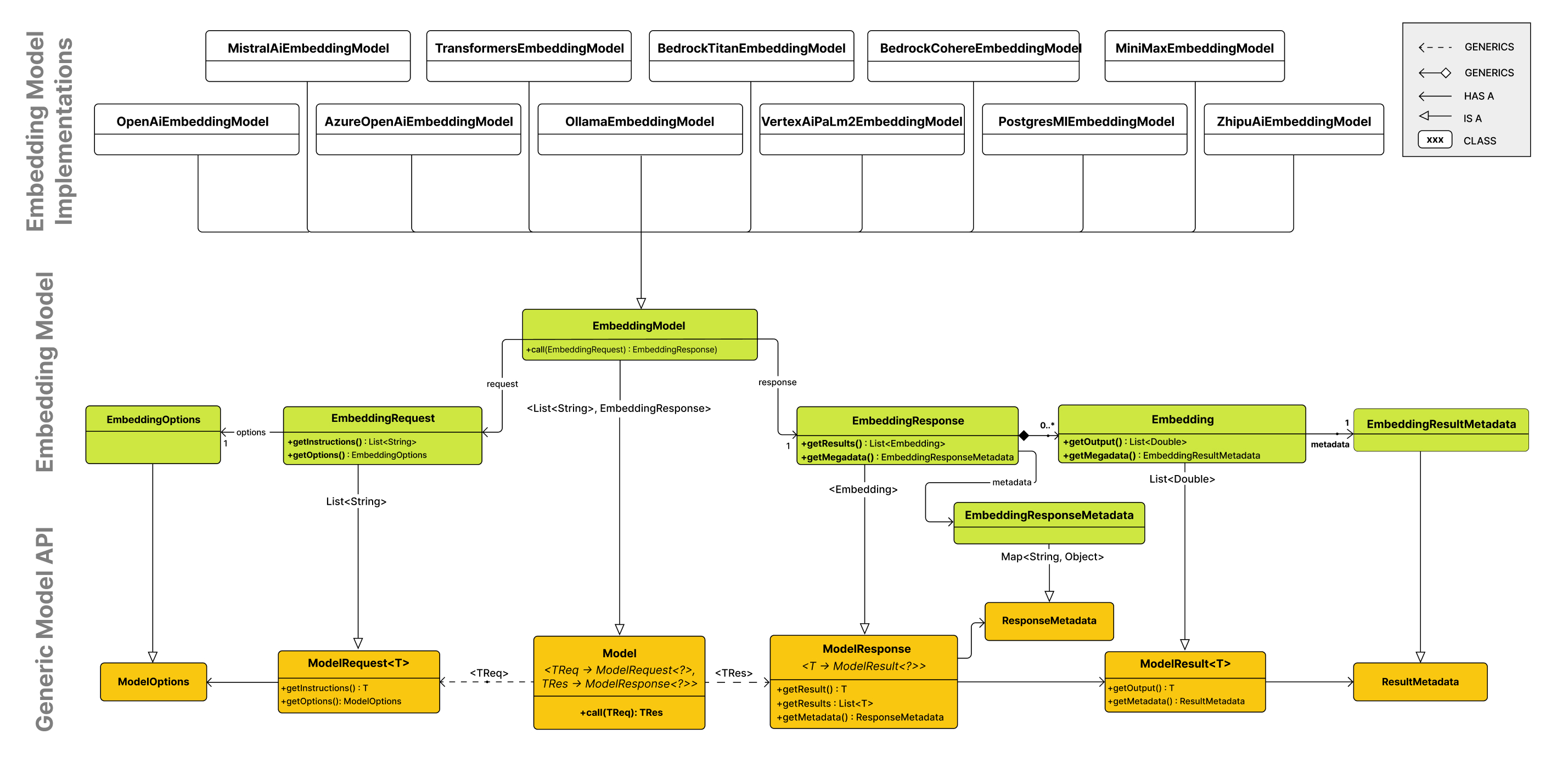
嵌入模型 API 构建在通用的 Spring AI 模型 API 之上,它是 Spring AI 库的一部分。因此,EmbeddingModel 接口扩展了 Model 接口,该接口提供了一组用于与 AI 模型交互的标准方法。EmbeddingRequest 和 EmbeddingResponse 类扩展自 ModelRequest 和 ModelResponse,分别用于封装嵌入模型的输入和输出。
嵌入 API 反过来又被更高级别的组件用于实现特定嵌入模型(如 OpenAI、Titan、Azure OpenAI、Ollie 等)的嵌入模型。
下图说明了嵌入 API 及其与 Spring AI 模型 API 和嵌入模型的关系
3.1.1. EmbeddingModel
public interface EmbeddingModel extends Model<EmbeddingRequest, EmbeddingResponse> {

	@Override
	EmbeddingResponse call(EmbeddingRequest request);


	/**
	 * Embeds the given document's content into a vector.
	 * @param document the document to embed.
	 * @return the embedded vector.
	 */
	float[] embed(Document document);

	/**
	 * Embeds the given text into a vector.
	 * @param text the text to embed.
	 * @return the embedded vector.
	 */
	default float[] embed(String text) {
		Assert.notNull(text, "Text must not be null");
		return this.embed(List.of(text)).iterator().next();
	}

	/**
	 * Embeds a batch of texts into vectors.
	 * @param texts list of texts to embed.
	 * @return list of list of embedded vectors.
	 */
	default List<float[]> embed(List<String> texts) {
		Assert.notNull(texts, "Texts must not be null");
		return this.call(new EmbeddingRequest(texts, EmbeddingOptions.EMPTY))
			.getResults()
			.stream()
			.map(Embedding::getOutput)
			.toList();
	}

	/**
	 * Embeds a batch of texts into vectors and returns the {@link EmbeddingResponse}.
	 * @param texts list of texts to embed.
	 * @return the embedding response.
	 */
	default EmbeddingResponse embedForResponse(List<String> texts) {
		Assert.notNull(texts, "Texts must not be null");
		return this.call(new EmbeddingRequest(texts, EmbeddingOptions.EMPTY));
	}

	/**
	 * @return the number of dimensions of the embedded vectors. It is generative
	 * specific.
	 */
	default int dimensions() {
		return embed("Test String").size();
	}

}
嵌入方法提供了将文本转换为嵌入的各种选项,可容纳单个字符串、结构化 Document 对象或批量文本。
提供了多种用于嵌入文本的快捷方法,包括 embed(String text) 方法,该方法接受单个字符串并返回相应的嵌入向量。所有快捷方法都围绕 call 方法实现,call 方法是调用嵌入模型的主要方法。
通常,嵌入返回一个浮点数列表,以数值向量格式表示嵌入。
embedForResponse 方法提供了更全面的输出,可能包括有关嵌入的附加信息。
维度方法是开发人员快速确定嵌入向量大小的便捷工具,这对于理解嵌入空间和后续处理步骤很重要。
3.1.1.1. EmbeddingRequest
EmbeddingRequest 是一个 ModelRequest,它接受文本对象列表和可选的嵌入请求选项。以下清单显示了 EmbeddingRequest 类的截断版本,不包括构造函数和其他实用方法
public class EmbeddingRequest implements ModelRequest<List<String>> {
	private final List<String> inputs;
	private final EmbeddingOptions options;
	// other methods omitted
}
3.1.1.2. EmbeddingResponse
EmbeddingResponse 类的结构如下
public class EmbeddingResponse implements ModelResponse<Embedding> {

	private List<Embedding> embeddings;
	private EmbeddingResponseMetadata metadata = new EmbeddingResponseMetadata();
	// other methods omitted
}
EmbeddingResponse 类保存 AI 模型的输出,每个 Embedding 实例都包含来自单个文本输入的的结果向量数据。
EmbeddingResponse 类还包含有关 AI 模型响应的 EmbeddingResponseMetadata 元数据。
3.1.1.3. Embedding
Embedding 表示单个嵌入向量。
public class Embedding implements ModelResult<float[]> {
	private float[] embedding;
	private Integer index;
	private EmbeddingResultMetadata metadata;
	// other methods omitted
}
3.2. 可用实现
在内部,各种 EmbeddingModel 实现使用不同的低级库和 API 来执行嵌入任务。以下是一些可用的 EmbeddingModel 实现
4. 图像模型API
Spring 图像模型API旨在提供一个简单且可移植的接口,用于与各种专门从事图像生成的AI模型进行交互,允许开发者以最少的代码更改在不同的图像相关模型之间切换。此设计符合Spring模块化和可互换性的理念,确保开发者可以快速使其应用程序适应与图像处理相关的不同AI功能。
此外,在ImagePrompt用于输入封装和ImageResponse用于输出处理等配套类的支持下,图像模型API统一了与专门用于图像生成的AI模型的通信。它管理请求准备和响应解析的复杂性,为图像生成功能提供了直接和简化的API交互。
Spring 图像模型API建立在Spring AI 通用模型API之上,提供图像特定的抽象和实现。
4.1. API 概述
本节提供了Spring 图像模型API接口和相关类的指南。
4.2. 图像模型
这里是ImageModel接口定义
@FunctionalInterface
public interface ImageModel extends Model<ImagePrompt, ImageResponse> {

	ImageResponse call(ImagePrompt request);

}
4.2.1. ImagePrompt
ImagePrompt是一个ModelRequest,它封装了ImageMessage对象的列表和可选的模型请求选项。以下列表显示了ImagePrompt类的截断版本,不包括构造函数和其他实用方法
public class ImagePrompt implements ModelRequest<List<ImageMessage>> {

    private final List<ImageMessage> messages;

	private ImageOptions imageModelOptions;

    @Override
	public List<ImageMessage> getInstructions() {...}

	@Override
	public ImageOptions getOptions() {...}

    // constructors and utility methods omitted
}
4.2.1.1. ImageMessage
ImageMessage类封装了要使用的文本以及该文本在影响生成的图像时应具有的权重。对于支持权重的模型,权重可以是正数或负数。
public class ImageMessage {

	private String text;

	private Float weight;

    public String getText() {...}

	public Float getWeight() {...}

   // constructors and utility methods omitted
}
4.2.1.2. ImageOptions
表示可以传递给图像生成模型的选项。ImageOptions接口扩展了ModelOptions接口,用于定义可以传递给AI模型的少数可移植选项。
ImageOptions接口定义如下
public interface ImageOptions extends ModelOptions {

	Integer getN();

	String getModel();

	Integer getWidth();

	Integer getHeight();

	String getResponseFormat(); // openai - url or base64 : stability ai byte[] or base64

}此外,每个模型特定的ImageModel实现都可以有自己的选项,可以传递给AI模型。例如,OpenAI图像生成模型有自己的选项,如quality、style等。
这是一个强大的功能,允许开发者在启动应用程序时使用模型特定的选项,然后在运行时使用ImagePrompt覆盖它们。
4.2.2. ImageResponse
ImageResponse类的结构如下
public class ImageResponse implements ModelResponse<ImageGeneration> {

	private final ImageResponseMetadata imageResponseMetadata;

	private final List<ImageGeneration> imageGenerations;

	@Override
	public ImageGeneration getResult() {
		// get the first result
	}

	@Override
	public List<ImageGeneration> getResults() {...}

	@Override
	public ImageResponseMetadata getMetadata() {...}

    // other methods omitted

}ImageResponse类保存了AI模型的输出,每个ImageGeneration实例包含单个提示可能产生的多个输出之一。
ImageResponse类还带有一个ImageResponseMetadata对象,其中包含有关AI模型响应的元数据。
4.2.3. ImageGeneration
最后,ImageGeneration类扩展自ModelResult,表示输出响应和有关此结果的相关元数据
public class ImageGeneration implements ModelResult<Image> {

	private ImageGenerationMetadata imageGenerationMetadata;

	private Image image;

    @Override
	public Image getOutput() {...}

	@Override
	public ImageGenerationMetadata getMetadata() {...}

    // other methods omitted

}
4.3. 可用实现
为以下模型提供商提供了ImageModel实现
5. 音频模型
5.1. 转录 API
Spring AI 通过 TranscriptionModel 接口提供统一的语音转文本转录 API。这允许您编写可跨不同转录提供商工作的可移植代码。
5.1.1. 支持的提供商
5.1.2. 通用接口
所有转录提供商都实现以下共享接口
5.1.2.1. TranscriptionModel
TranscriptionModel 接口提供将音频转换为文本的方法
public interface TranscriptionModel extends Model<AudioTranscriptionPrompt, AudioTranscriptionResponse> {

    /**
     * Transcribes the audio from the given prompt.
     */
    AudioTranscriptionResponse call(AudioTranscriptionPrompt transcriptionPrompt);

    /**
     * A convenience method for transcribing an audio resource.
     */
    default String transcribe(Resource resource) {
        AudioTranscriptionPrompt prompt = new AudioTranscriptionPrompt(resource);
        return this.call(prompt).getResult().getOutput();
    }

    /**
     * A convenience method for transcribing an audio resource with options.
     */
    default String transcribe(Resource resource, AudioTranscriptionOptions options) {
        AudioTranscriptionPrompt prompt = new AudioTranscriptionPrompt(resource, options);
        return this.call(prompt).getResult().getOutput();
    }
}
5.1.2.2. AudioTranscriptionPrompt
AudioTranscriptionPrompt 类封装了输入音频和选项
Resource audioFile = new FileSystemResource("/path/to/audio.mp3");
AudioTranscriptionPrompt prompt = new AudioTranscriptionPrompt(
    audioFile,
    options
);
5.1.2.3. AudioTranscriptionResponse
AudioTranscriptionResponse 类包含转录的文本和元数据
AudioTranscriptionResponse response = model.call(prompt);
String transcribedText = response.getResult().getOutput();
AudioTranscriptionResponseMetadata metadata = response.getMetadata();
5.1.3. 编写与提供商无关的代码
共享转录接口的关键好处之一是能够编写适用于任何转录提供商而无需修改的代码。实际提供商(OpenAI、Azure OpenAI 等)由您的 Spring Boot 配置决定,允许您在不更改应用程序代码的情况下切换提供商。
5.1.3.1. 基本服务示例
共享接口允许您编写适用于任何转录提供商的代码
@Service
public class TranscriptionService {

    private final TranscriptionModel transcriptionModel;

    public TranscriptionService(TranscriptionModel transcriptionModel) {
        this.transcriptionModel = transcriptionModel;
    }

    public String transcribeAudio(Resource audioFile) {
        return transcriptionModel.transcribe(audioFile);
    }

    public String transcribeWithOptions(Resource audioFile, AudioTranscriptionOptions options) {
        AudioTranscriptionPrompt prompt = new AudioTranscriptionPrompt(audioFile, options);
        AudioTranscriptionResponse response = transcriptionModel.call(prompt);
        return response.getResult().getOutput();
    }
}
该服务与 OpenAI、Azure OpenAI 或任何其他转录提供商无缝协作,实际实现由您的 Spring Boot 配置决定。
5.1.4. 提供商特定功能
虽然共享接口提供了可移植性,但每个提供商还通过提供商特定选项类(例如,OpenAiAudioTranscriptionOptions,AzureOpenAiAudioTranscriptionOptions)提供特定功能。这些类实现 AudioTranscriptionOptions 接口,同时添加提供商特定的功能。
5.2. 文本转语音 (TTS) API
Spring AI 通过 TextToSpeechModel 和 StreamingTextToSpeechModel 接口提供了统一的文本转语音 (TTS) API。这使您能够编写可在不同 TTS 提供商之间通用的可移植代码。
5.2.1. 支持的提供商
5.2.2. 通用接口
所有 TTS 提供商都实现以下共享接口
5.2.2.1. TextToSpeechModel
TextToSpeechModel 接口提供将文本转换为语音的方法
public interface TextToSpeechModel extends Model<TextToSpeechPrompt, TextToSpeechResponse>, StreamingTextToSpeechModel {

    /**
     * Converts text to speech with default options.
     */
    default byte[] call(String text) {
        // Default implementation
    }

    /**
     * Converts text to speech with custom options.
     */
    TextToSpeechResponse call(TextToSpeechPrompt prompt);

    /**
     * Returns the default options for this model.
     */
    default TextToSpeechOptions getDefaultOptions() {
        // Default implementation
    }
}
5.2.2.2. StreamingTextToSpeechModel
StreamingTextToSpeechModel 接口提供实时流式传输音频的方法
@FunctionalInterface
public interface StreamingTextToSpeechModel extends StreamingModel<TextToSpeechPrompt, TextToSpeechResponse> {

    /**
     * Streams text-to-speech responses with metadata.
     */
    Flux<TextToSpeechResponse> stream(TextToSpeechPrompt prompt);

    /**
     * Streams audio bytes for the given text.
     */
    default Flux<byte[]> stream(String text) {
        // Default implementation
    }
}
5.2.2.3. TextToSpeechPrompt
TextToSpeechPrompt 类封装了输入文本和选项
TextToSpeechPrompt prompt = new TextToSpeechPrompt(
    "Hello, this is a text-to-speech example.",
    options
);
5.2.2.4. TextToSpeechResponse
TextToSpeechResponse 类包含生成的音频和元数据
TextToSpeechResponse response = model.call(prompt);
byte[] audioBytes = response.getResult().getOutput();
TextToSpeechResponseMetadata metadata = response.getMetadata();
5.2.3. 编写与提供商无关的代码
共享 TTS 接口的关键优势之一是能够编写与任何 TTS 提供商兼容的代码,无需修改。实际的提供商(OpenAI、ElevenLabs 等)由您的 Spring Boot 配置决定,允许您在不更改应用程序代码的情况下切换提供商。
5.2.3.1. 基本服务示例
共享接口允许您编写与任何 TTS 提供商兼容的代码
@Service
public class NarrationService {

    private final TextToSpeechModel textToSpeechModel;

    public NarrationService(TextToSpeechModel textToSpeechModel) {
        this.textToSpeechModel = textToSpeechModel;
    }

    public byte[] narrate(String text) {
        // Works with any TTS provider
        return textToSpeechModel.call(text);
    }

    public byte[] narrateWithOptions(String text, TextToSpeechOptions options) {
        TextToSpeechPrompt prompt = new TextToSpeechPrompt(text, options);
        TextToSpeechResponse response = textToSpeechModel.call(prompt);
        return response.getResult().getOutput();
    }
}
此服务与 OpenAI、ElevenLabs 或任何其他 TTS 提供商无缝协作,实际实现由您的 Spring Boot 配置决定。
5.2.3.2. 高级示例:多提供商支持
您可以构建同时支持多个 TTS 提供商的应用程序
@Service
public class MultiProviderNarrationService {

    private final Map<String, TextToSpeechModel> providers;

    public MultiProviderNarrationService(List<TextToSpeechModel> models) {
        // Spring will inject all available TextToSpeechModel beans
        this.providers = models.stream()
            .collect(Collectors.toMap(
                model -> model.getClass().getSimpleName(),
                model -> model
            ));
    }

    public byte[] narrateWithProvider(String text, String providerName) {
        TextToSpeechModel model = providers.get(providerName);
        if (model == null) {
            throw new IllegalArgumentException("Unknown provider: " + providerName);
        }
        return model.call(text);
    }

    public Set<String> getAvailableProviders() {
        return providers.keySet();
    }
}
5.2.3.3. 流式音频示例
共享接口还支持流式传输以实现实时音频生成
@Service
public class StreamingNarrationService {

    private final TextToSpeechModel textToSpeechModel;

    public StreamingNarrationService(TextToSpeechModel textToSpeechModel) {
        this.textToSpeechModel = textToSpeechModel;
    }

    public Flux<byte[]> streamNarration(String text) {
        // TextToSpeechModel extends StreamingTextToSpeechModel
        return textToSpeechModel.stream(text);
    }

    public Flux<TextToSpeechResponse> streamWithMetadata(String text, TextToSpeechOptions options) {
        TextToSpeechPrompt prompt = new TextToSpeechPrompt(text, options);
        return textToSpeechModel.stream(prompt);
    }
}
5.2.3.4. REST 控制器示例
使用与提供商无关的 TTS 构建 REST API
@RestController
@RequestMapping("/api/tts")
public class TextToSpeechController {

    private final TextToSpeechModel textToSpeechModel;

    public TextToSpeechController(TextToSpeechModel textToSpeechModel) {
        this.textToSpeechModel = textToSpeechModel;
    }

    @PostMapping(value = "/synthesize", produces = "audio/mpeg")
    public ResponseEntity<byte[]> synthesize(@RequestBody SynthesisRequest request) {
        byte[] audio = textToSpeechModel.call(request.text());
        return ResponseEntity.ok()
            .contentType(MediaType.parseMediaType("audio/mpeg"))
            .header("Content-Disposition", "attachment; filename=\"speech.mp3\"")
            .body(audio);
    }

    @GetMapping(value = "/stream", produces = MediaType.APPLICATION_OCTET_STREAM_VALUE)
    public Flux<byte[]> streamSynthesis(@RequestParam String text) {
        return textToSpeechModel.stream(text);
    }

    record SynthesisRequest(String text) {}
}
5.2.3.5. 基于配置的提供商选择
使用 Spring 配置文件或属性在提供商之间切换
# application-openai.yml
spring:
  ai:
    model:
      audio:
        speech: openai
    openai:
      api-key: ${OPENAI_API_KEY}
      audio:
        speech:
          options:
            model: gpt-4o-mini-tts
            voice: alloy

# application-elevenlabs.yml
spring:
  ai:
    model:
      audio:
        speech: elevenlabs
    elevenlabs:
      api-key: ${ELEVENLABS_API_KEY}
      tts:
        options:
          model-id: eleven_turbo_v2_5
          voice-id: your_voice_id
然后激活所需的提供商
# Use OpenAI
java -jar app.jar --spring.profiles.active=openai

# Use ElevenLabs
java -jar app.jar --spring.profiles.active=elevenlabs
5.2.3.6. 使用可移植选项
为了实现最大的可移植性,请仅使用通用的 TextToSpeechOptions 接口方法
@Service
public class PortableNarrationService {

    private final TextToSpeechModel textToSpeechModel;

    public PortableNarrationService(TextToSpeechModel textToSpeechModel) {
        this.textToSpeechModel = textToSpeechModel;
    }

    public byte[] createPortableNarration(String text) {
        // Use provider's default options for maximum portability
        TextToSpeechOptions defaultOptions = textToSpeechModel.getDefaultOptions();
        TextToSpeechPrompt prompt = new TextToSpeechPrompt(text, defaultOptions);
        TextToSpeechResponse response = textToSpeechModel.call(prompt);
        return response.getResult().getOutput();
    }
}
5.2.3.7. 使用提供商特定功能
当您需要提供商特定功能时,您仍然可以使用它们,同时保持代码库的可移植性
@Service
public class FlexibleNarrationService {

    private final TextToSpeechModel textToSpeechModel;

    public FlexibleNarrationService(TextToSpeechModel textToSpeechModel) {
        this.textToSpeechModel = textToSpeechModel;
    }

    public byte[] narrate(String text, TextToSpeechOptions baseOptions) {
        TextToSpeechOptions options = baseOptions;

        // Apply provider-specific optimizations if available
        if (textToSpeechModel instanceof OpenAiAudioSpeechModel) {
            options = OpenAiAudioSpeechOptions.builder()
                .from(baseOptions)
                .model("gpt-4o-tts")  // OpenAI-specific: use high-quality model
                .speed(1.0)
                .build();
        } else if (textToSpeechModel instanceof ElevenLabsTextToSpeechModel) {
            // ElevenLabs-specific options could go here
        }

        TextToSpeechPrompt prompt = new TextToSpeechPrompt(text, options);
        TextToSpeechResponse response = textToSpeechModel.call(prompt);
        return response.getResult().getOutput();
    }
}
5.2.3.8. 可移植代码的最佳实践
依赖接口:始终注入
TextToSpeechModel而不是具体的实现使用通用选项:坚持使用
TextToSpeechOptions接口方法以实现最大的可移植性优雅地处理元数据:不同的提供商返回不同的元数据;通用地处理它
使用多个提供商进行测试:确保您的代码至少与两个 TTS 提供商兼容
文档化提供商假设:如果您依赖特定提供商的行为,请清楚地记录下来
5.2.4. 提供商特定功能
虽然共享接口提供了可移植性,但每个提供商还通过提供商特定的选项类(例如 OpenAiAudioSpeechOptions、ElevenLabsSpeechOptions)提供特定功能。这些类实现了 TextToSpeechOptions 接口,同时添加了提供商特定的功能。
6. 审核模型
检测文本中潜在有害或敏感的内容
评论区